By Erin Beattie, Founder and CCO, Engage + Empower Consulting
I used a project management tool religiously for years at my last corporate job. Knew every corner of it. When I left and started building something of my own, I had to reckon with two things at once: it couldn’t grow alongside what I was building, and I couldn’t separate the product from the people running it. When someone else is picking the tools, it’s easy to look away from that. When you’re the one deciding, you don’t get to.
So I went looking for something better. And I ran headfirst into the same problem everyone runs into: every comparison post out there is either a feature matrix built by a software company trying to win your click, or a listicle that tells you ClickUp is number one and calls it a day.
This isn’t that.
What I actually wanted to know was simpler and harder at the same time: which tool is right for who I am right now, at this stage of building, with these actual needs? Not which one has the most integrations. Not which one topped some sponsored roundup.
Here’s what I found.
The question nobody asks
Most comparison posts organize tools by features. This one organizes them by people.
Because the right tool isn’t the one with the longest feature list. It’s the one that fits where you actually are, what you’re actually managing, and what you have the time and capacity to learn. A tool that’s too simple will cap you. A tool that’s too complex will become a full-time job to maintain. And a tool that looks great in a demo but falls apart in daily use will cost you more than the monthly subscription.
So before we get into specifics: who are you right now? That’s the question worth sitting with.
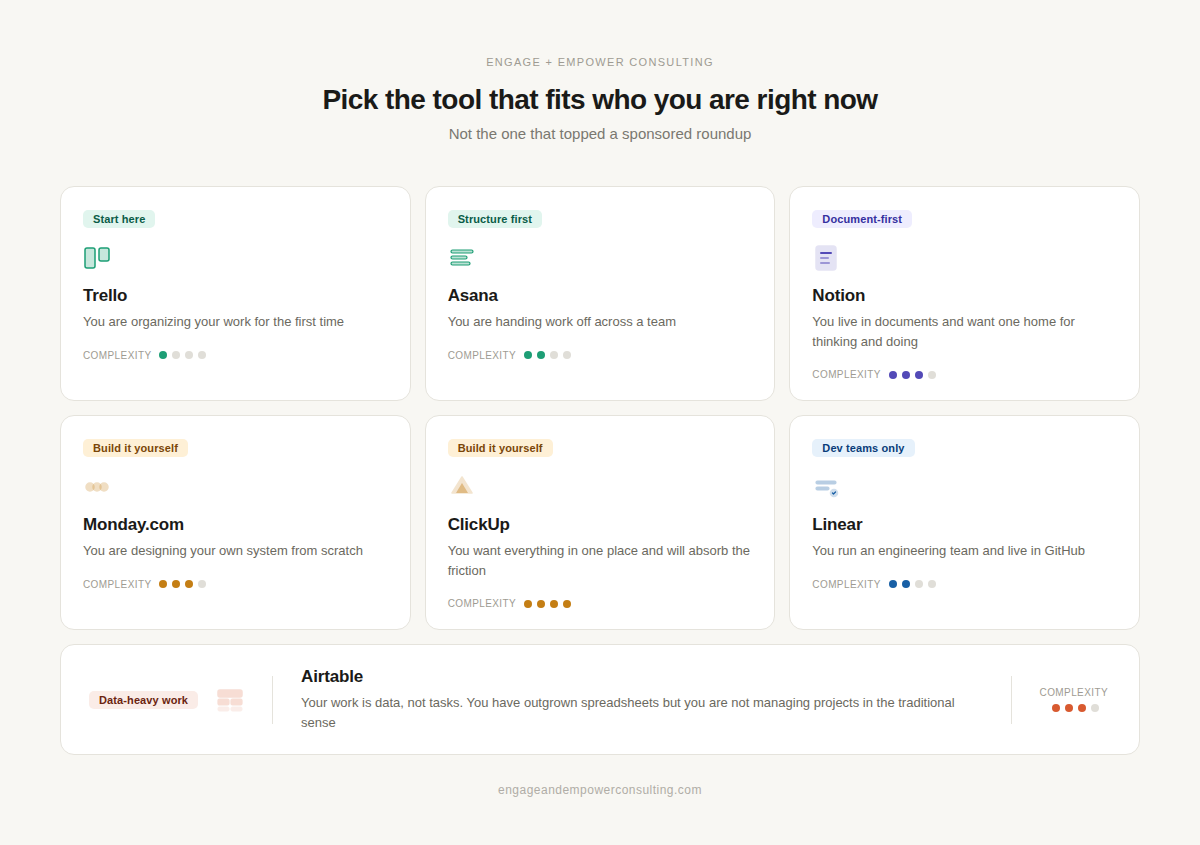
Trello: for when you’re organizing your brain
Trello is a Kanban board. Lists and cards you drag around. That’s the whole thing, and for a lot of people, that’s exactly what they need.
It’s super easy to use. The free plan covers 10 boards and unlimited cards for unlimited users, which is more generous than most. There are templates for content calendars, sprint planning, onboarding, you name it. If you think visually, if you’re a small team just getting started, if you need to see the shape of your work without learning a new system from scratch, Trello works.
The ceiling hits fast, though. There’s no native time tracking. No budgeting. No reporting worth mentioning. The moment someone asks, “How are we tracking against our deliverables?” or “Who’s overloaded this week?” Trello will shrug at you. It was built to manage tasks, not to help you understand your work.
This is your tool if: You’re starting out. You need simplicity. You’re comfortable knowing you’ll probably outgrow it.
Asana: for structured environments and clean handoffs
Asana is often what people end up on when they need something more than Trello but aren’t sure what that something is. It’s more capable without being overwhelming, which is its selling point and its limitation.
It has five project views: list, board, calendar, timeline, and Gantt. There’s built-in time tracking, a workload chart for basic resource visibility, and a solid automation library. If your work has a consistent structure, if you hand tasks off across a team, if you need people to know what’s theirs without a lot of back-and-forth, Asana handles that cleanly.
It’s also often the tool that people inherit in corporate environments and then try to replicate when they leave. That familiarity has value.
The honest limitation is that Asana doesn’t commit to being particularly great at anything beyond project and task management. No financial management. Limited reporting. It’s a perfectly good tool, but it won’t give you a real picture of how your business is doing.
This is your tool if: You manage structured workflows with a team. You want something that works without much configuration. You don’t need financial visibility baked in.
Monday.com: for people who want to build their own system
Monday.com is what you use when you’ve carefully thought through how work should flow, and you want a tool that matches your thinking, not fights it. It has over 10 project views, no-code automations, customizable dashboards with widgets, and it works across industries that don’t look like typical tech companies: retail, operations, and construction.
The flexibility is real. So is the cost of that flexibility.
Monday is essentially a blank canvas. You’re the architect. When they work, the automations are crazy powerful. When they don’t, they just silently fail, and your team misses things. More than one person has described it as “a to-do list, but more colourful,” which is a little unfair and also not entirely wrong. If you invest the time to build it out properly and maintain it, Monday can be excellent. If you need something plug-and-play, this will frustrate you. Trust me.
This is your tool if: You’re a builder. You have specific workflows that don’t fit a standard template. You have the time and patience to configure it properly and keep it that way.
ClickUp: for technical teams who want everything in one place
ClickUp has the deepest feature set of the popular options. Sprint management. Burndown charts. GitHub integration. Built-in docs and whiteboards. AI tools for summarizing tasks and generating project plans. If you want to consolidate your tool stack into one place, ClickUp makes a reasonable case for being that place.
The trade-off is real, though. Performance issues and bugs are a recurring complaint in user reviews. ClickUp 3.0 was supposed to address this. It’s improved things, but “improved” and “solved” aren’t the same thing. For a team that moves fast and can absorb some friction in exchange for features, it’s worth considering. For teams that need reliability above everything else, the instability gets old quickly.
ClickUp also has specific strengths for agile and engineering-adjacent workflows. If your team lives in GitHub and needs sprint tracking alongside project management, it’s a better fit than most of the options on this list, except for Linear.
This is your tool if you’re technical or manage technical teams. You want maximum features, and you’ll tolerate some rough edges to get them. You’re consolidating multiple tools into a single tool.
Notion: for knowledge workers who live in documents
Notion isn’t really a project management tool. It’s a wiki-database hybrid that millions of people use, which tells you about the market gap and Notion’s flexibility.
You can build custom databases, Kanban views, meeting notes systems, client trackers, content calendars, and internal wikis, all in one place. The AI features are genuinely useful for drafting, summarizing, and organizing. There are thousands of templates. If you’re a consultant, a writer, a solopreneur, or anyone whose work is fundamentally document- and knowledge-based, Notion is worth a serious look.
The flexibility is also the trap. Notion can become an elaborate, beautiful system that takes more time to maintain than the work it’s supposed to organize. It requires you to build your own structure from scratch, which is either exciting or exhausting, depending on who you are. It also lacks native time tracking, meaningful workload management, and financial tools.
This is your tool if: You think in documents and systems. You’re comfortable building your own structure. Your work is more knowledge-heavy than task-heavy. You want one home for thinking and doing.
Linear: for engineering and product teams specifically
Linear isn’t a general-purpose tool, and it doesn’t try to be. It was built specifically for software development teams: sprint cycles, issue tracking, GitHub and GitLab integrations, a fast keyboard-driven interface, and AI-assisted issue descriptions.
People who use it tend to love it. It’s opinionated, so you don’t spend much time configuring it. It knows what it’s for, and it does that thing really well. Developers who find Jira exhausting and Asana too light often land here and stay.
If you’re not managing an engineering or product team, this is not your conversation.
This is your tool if: you run a dev team. Your team lives in GitHub. You want something fast, focused, and designed specifically for how software development actually works.
Airtable: for data-heavy work that doesn’t fit standard project management
Airtable sits between a spreadsheet and a project management tool. If you’ve outgrown Excel but what you’re actually managing is data, not tasks, Airtable is worth knowing about.
It works well for content pipelines, product inventories, CRMs, client databases, and anything where the rows and fields matter as much as the tasks themselves. You can layer Kanban, gallery, and calendar views on top of your data. The relational database features are powerful once you understand them.
The learning curve is real, especially if you want automations and linked records to work properly. And like most tools on this list, it doesn’t address business financials.
This is your tool if: your work is fundamentally data management. You track a lot of interconnected information and need to see it in multiple ways. You’re comfortable with a steeper setup process.
The gap nobody talks about
Here’s the thing: all of these tools have in common: they manage work. None of them manages a business.
Time tracking that syncs to your invoicing. Resource planning that accounts for actual capacity, not just who’s assigned to what. Budget tracking against project scope. Revenue forecasting that tells you whether what you’re building is actually sustainable.
When you’re growing, that gap becomes the whole problem. These tools will help you see what’s happening. Fewer of them will help you understand whether what’s happening is working.
That’s not a knock on any of them. It’s a question worth asking before you commit, especially if you’re in a growth phase where the answers to those financial questions matter more than the task board.
The decision underneath the decision
The tool you pick is a values decision as much as a features decision. It shapes how your team communicates, what you can see clearly, and what you have to guess at. It reflects what you think work should look like and who should have visibility into what.
Getting it right early isn’t perfectionism; it’s a strategy.
And sometimes getting it right also means walking away from something familiar when the people building it show you who they are. That’s not overthinking. That’s just integrity, applied to how you work.
If you’re in the middle of this decision and want to think it through with someone, that’s exactly the kind of conversation I have with clients. Get in touch.
Erin Beattie is the Founder and CCO of Engage + Empower Consulting, where strategy meets humanity. She works with organizations navigating growth, communication, and the messy, important work of building something worth building.